NAREN.

[Case study · Mobile app]

Process

Maintenance Worker Hiring App

A C2C maintenance worker hiring platform designed to help residential and commercial property owners discover, evaluate and hire trusted maintenance professionals.

  • My role: UX Researcher & Product Designer
  • Platform: Mobile Application
  • Tools: Figma, FigJam
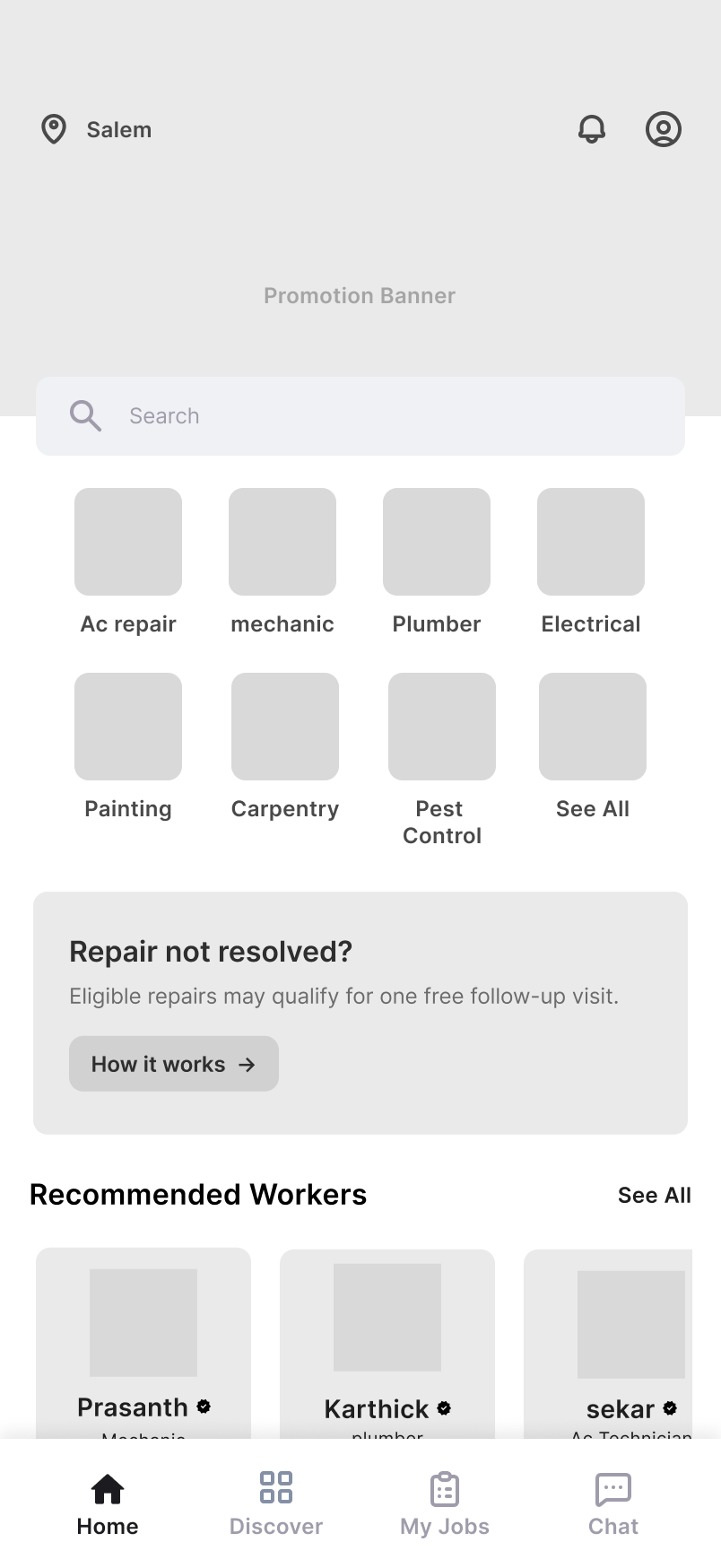
Process low-fidelity Home Screen
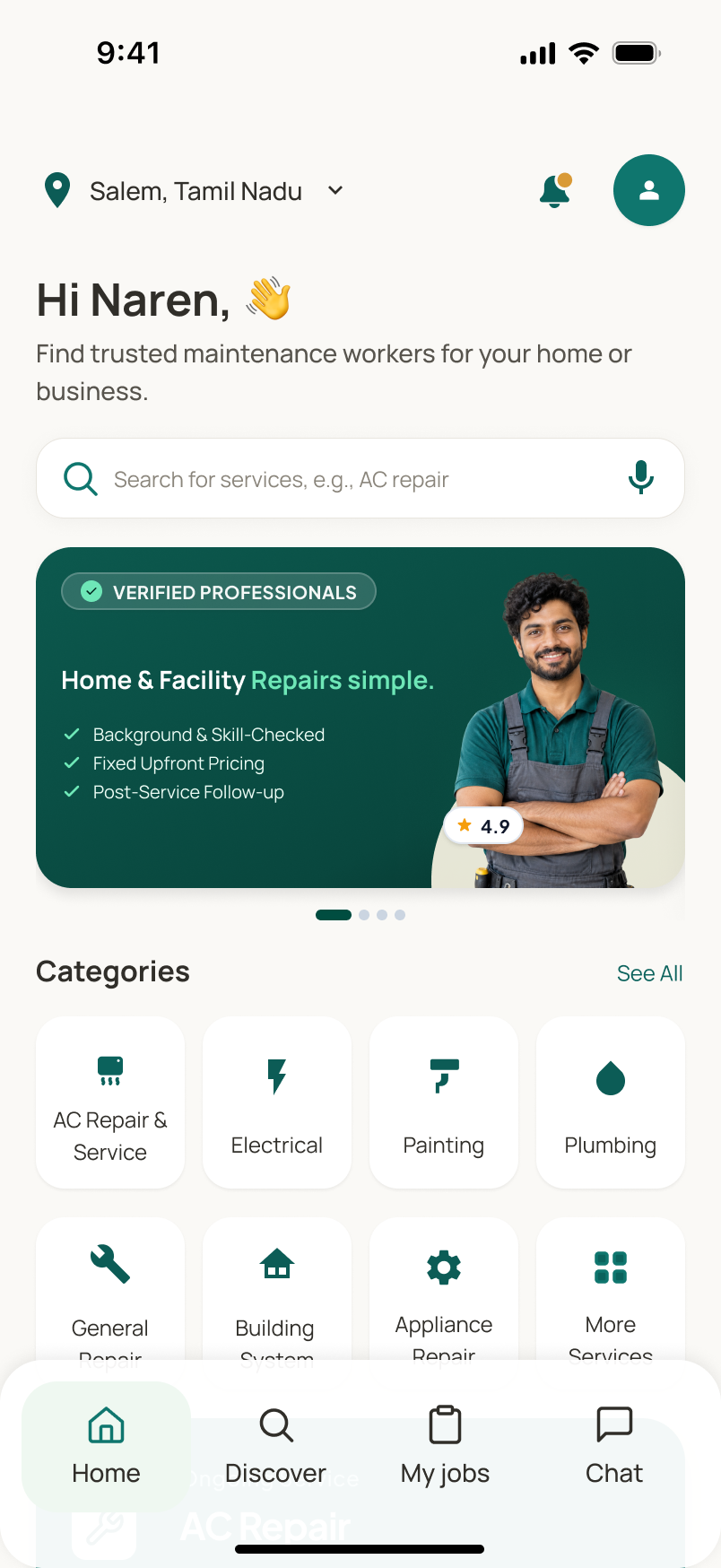
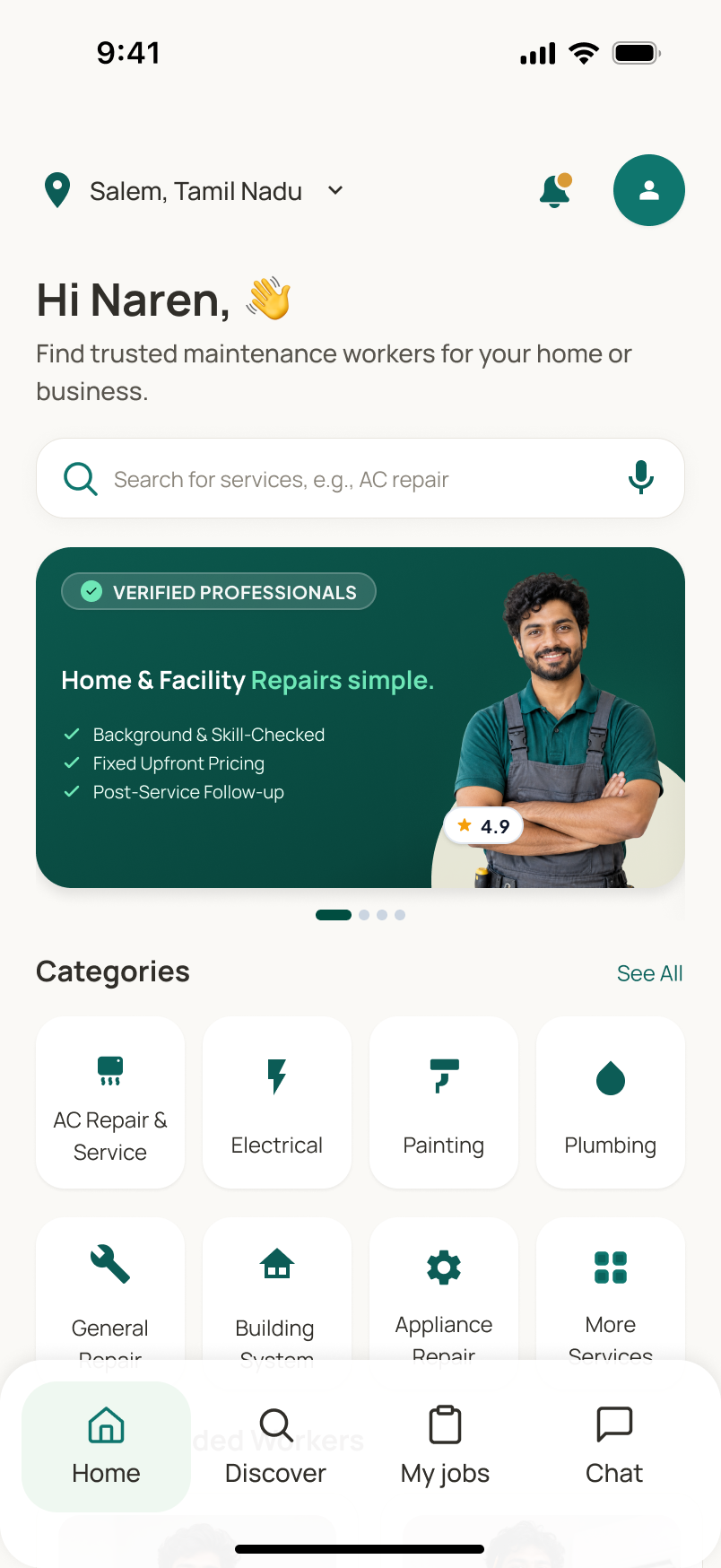
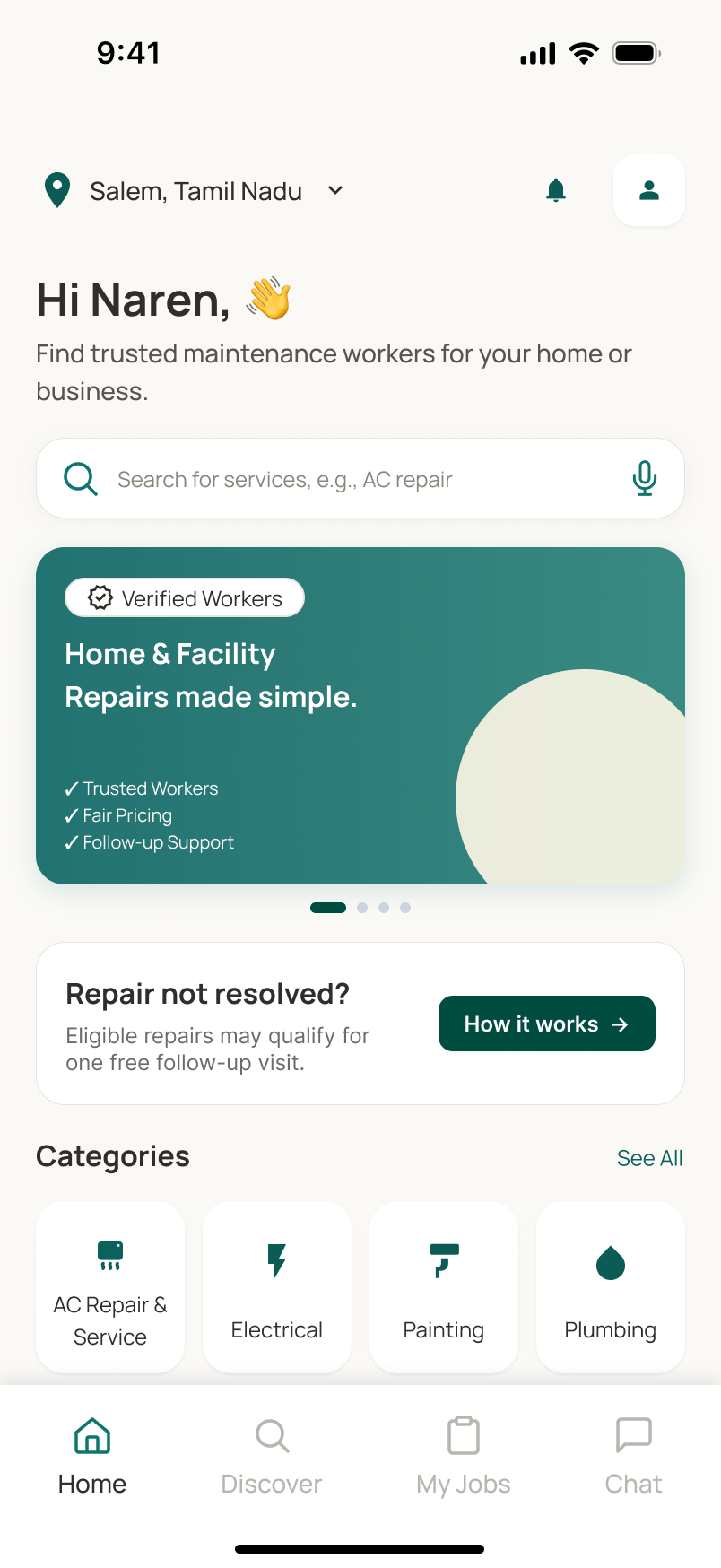
Process high-fidelity Home Screen
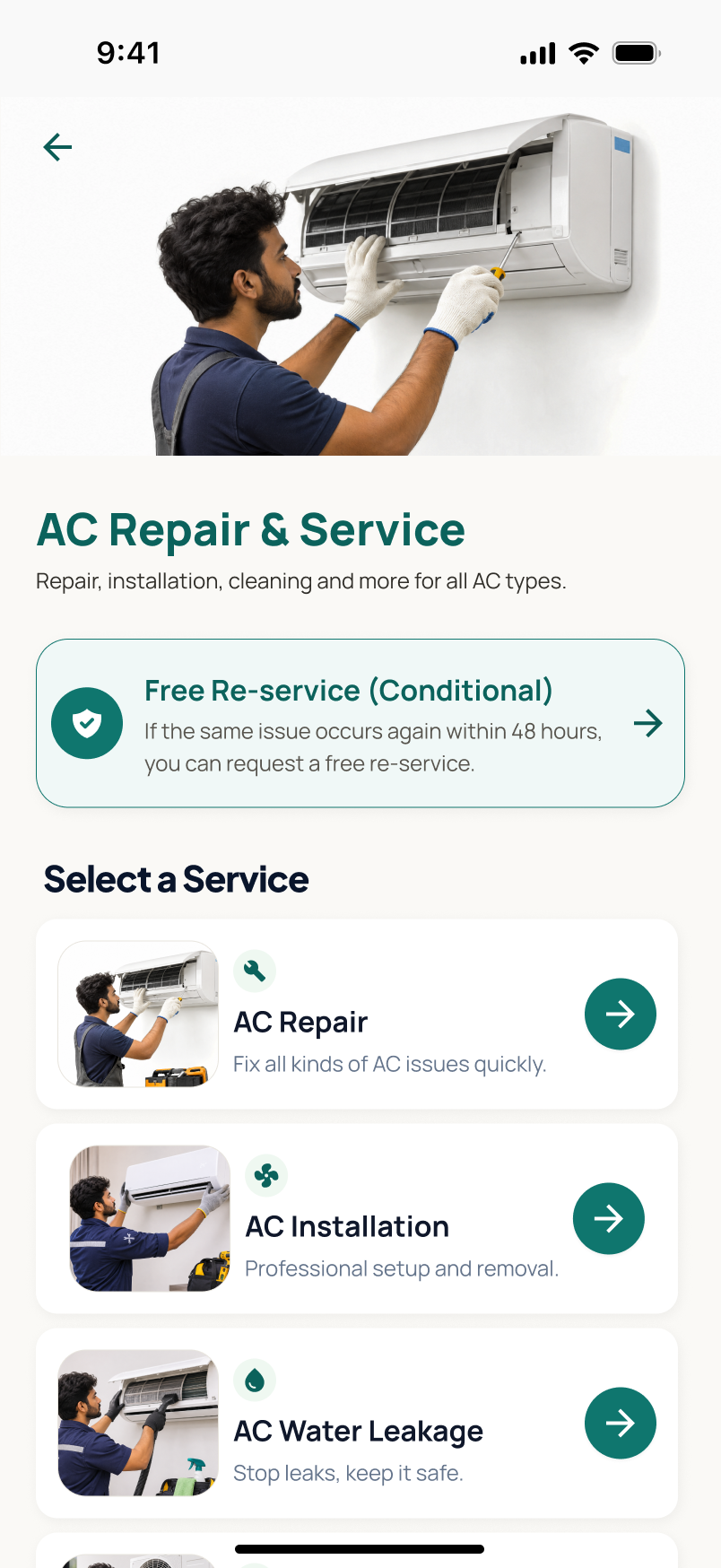
Process Category & Discover screen

Highlights

Primary research with six participants
Affinity mapping and empathy mapping
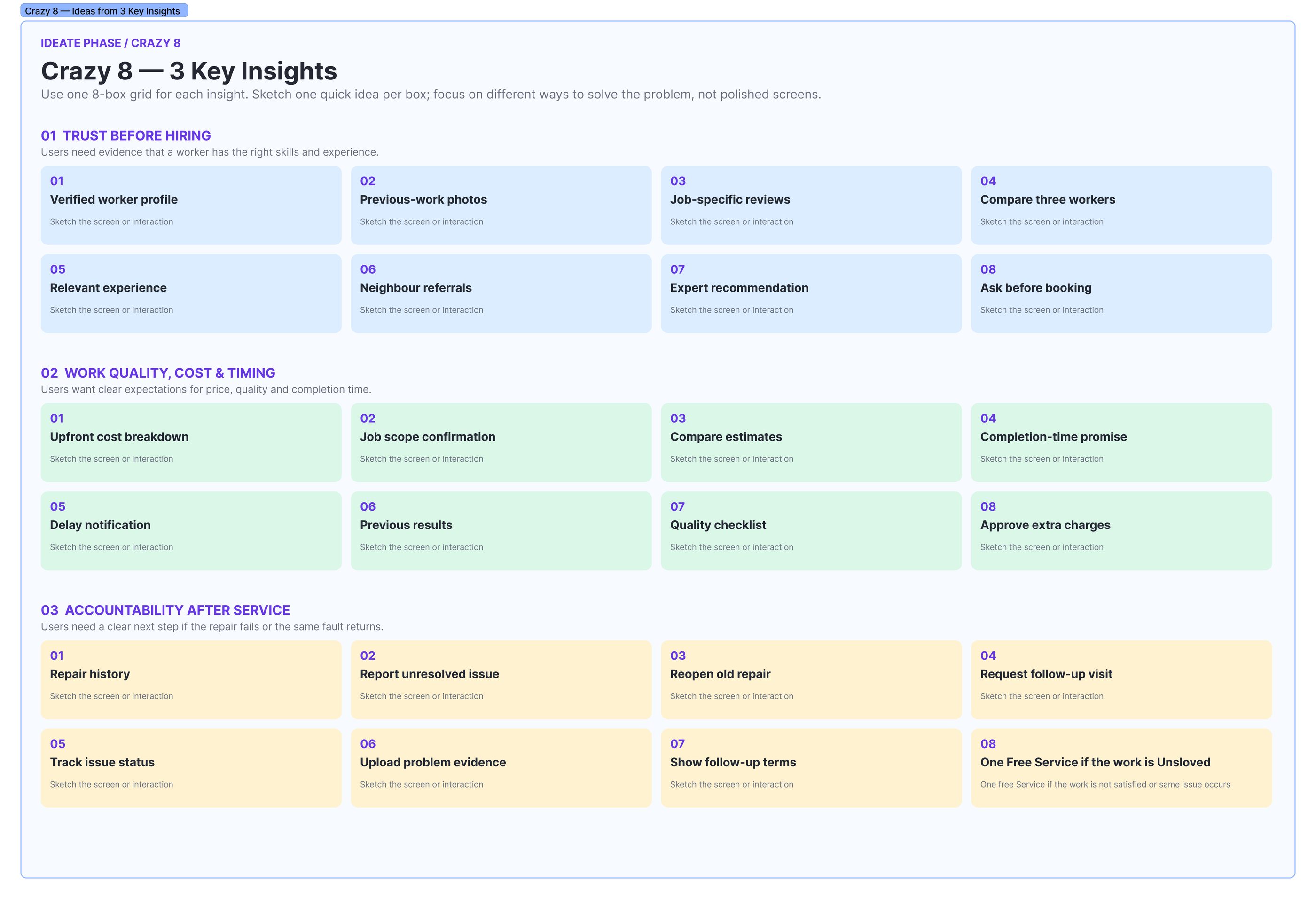
Crazy 8s ideation with 24 concepts
Worker verification profiles
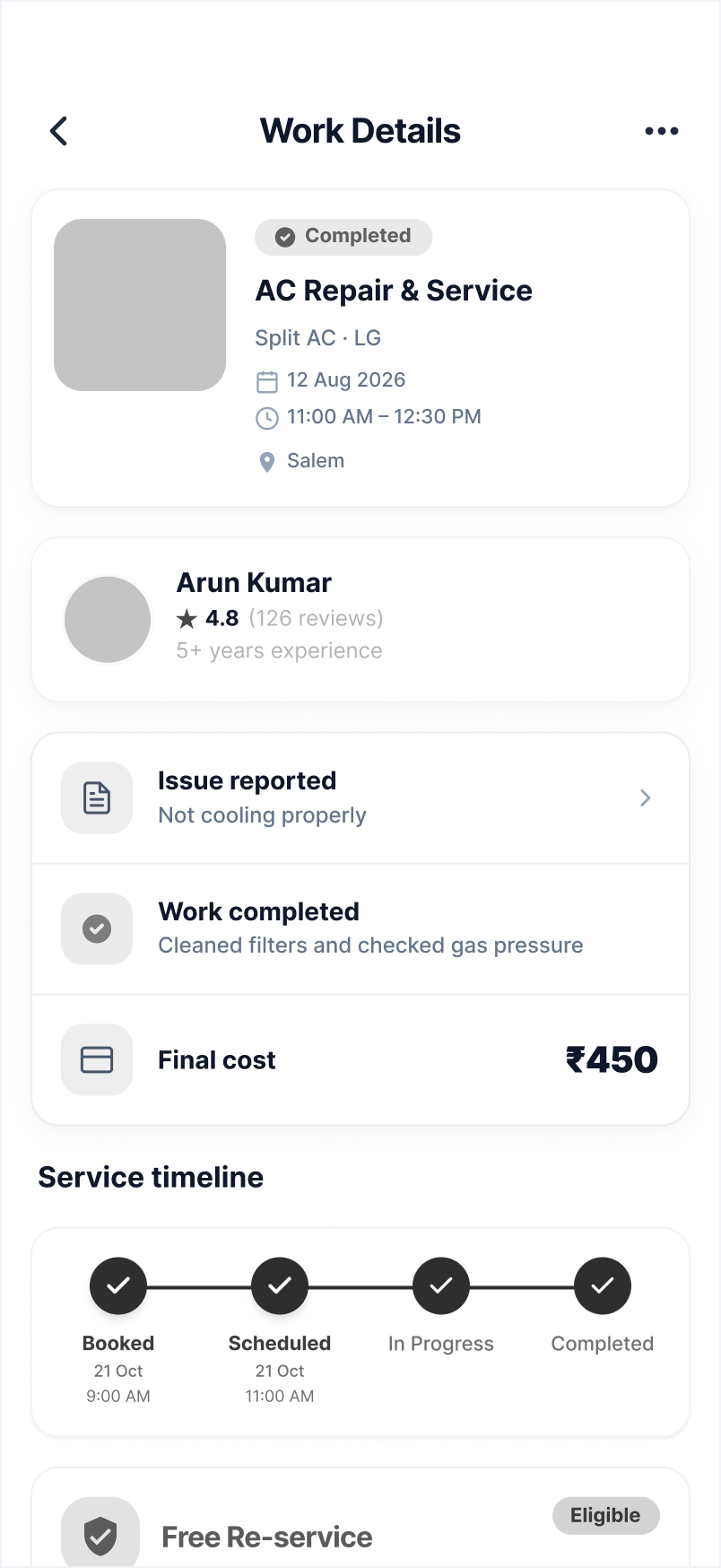
Live work progress tracking
Additional-cost approval
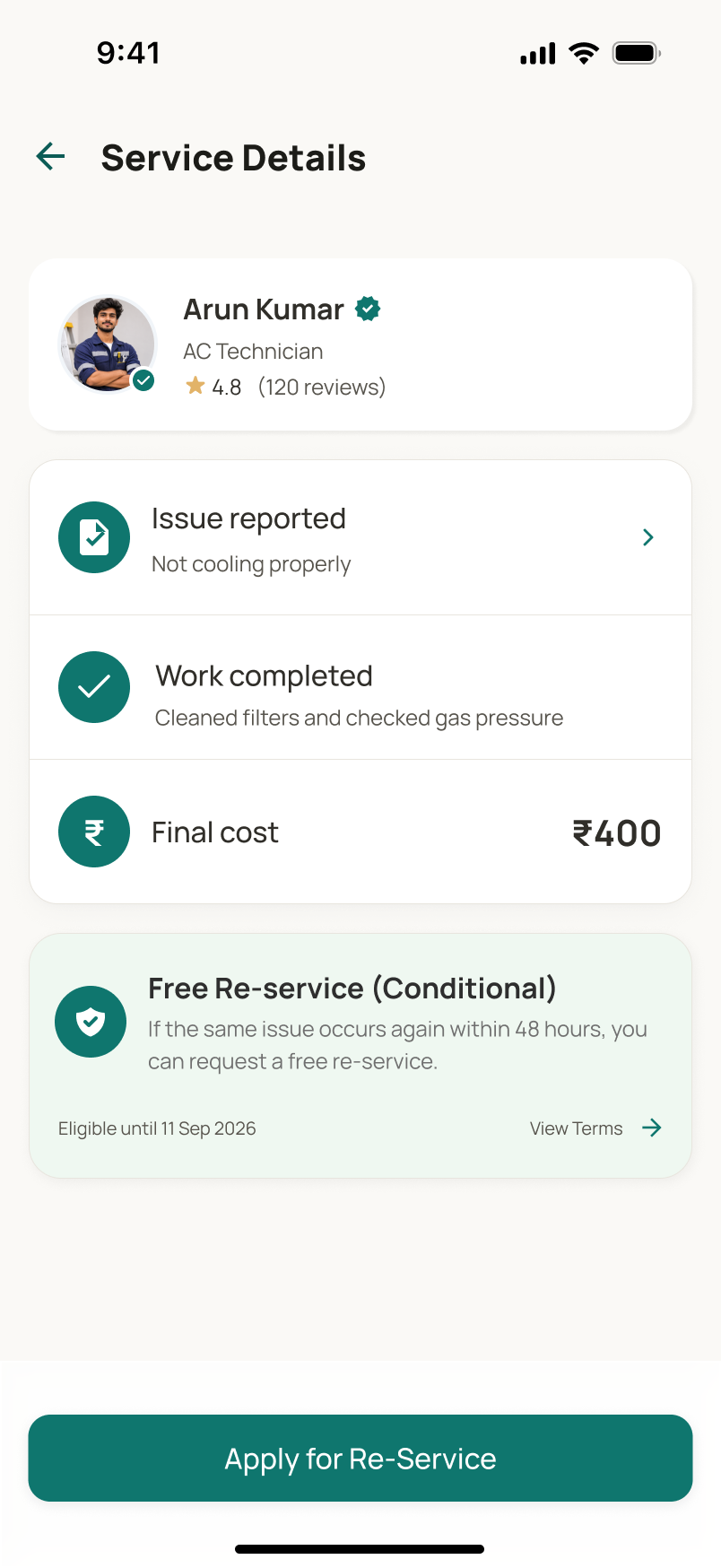
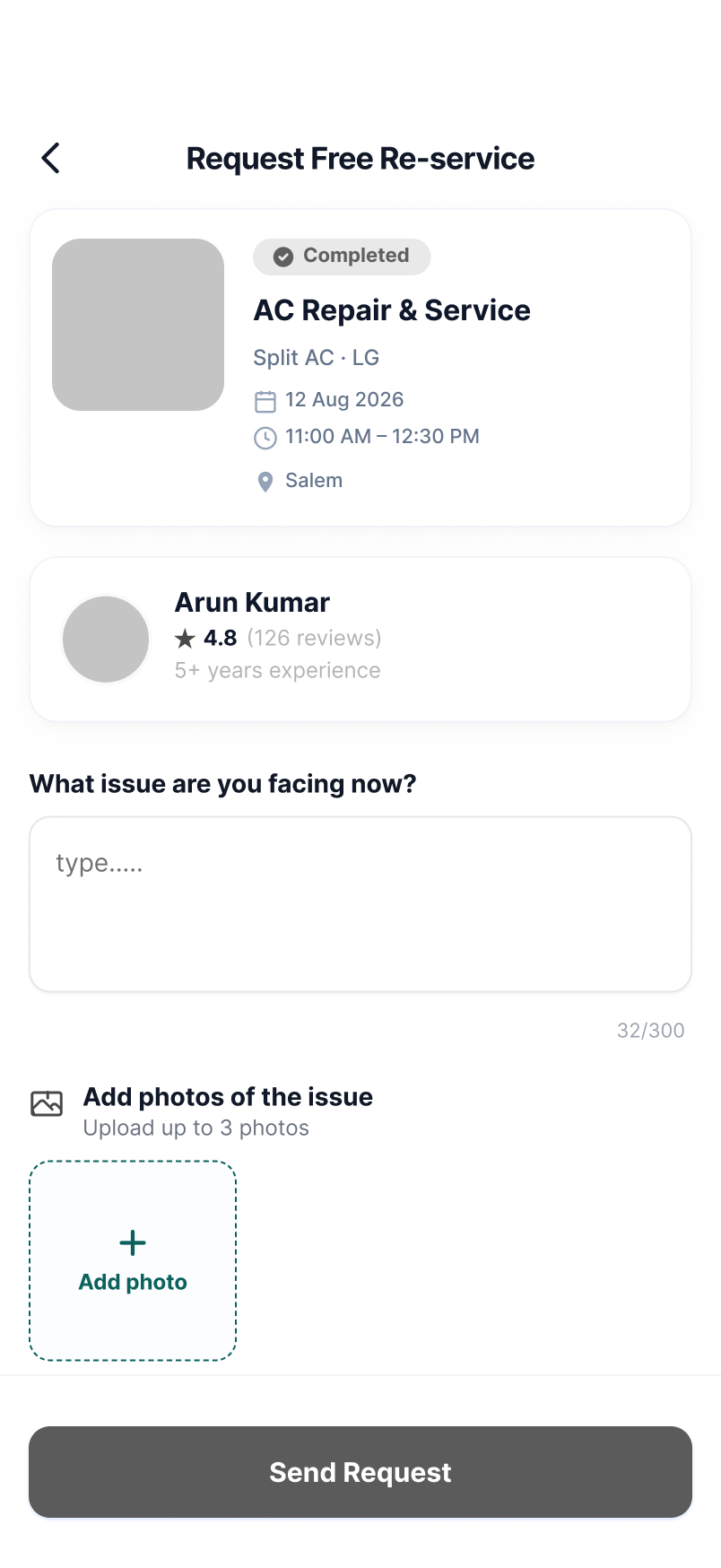
Conditional re-service requests

[The problem]

Propertyownersstruggletofindmaintenanceworkerstheycantrust.Onceajobbegins,progressishardtosee,costscanchangewithoutagreementandthereislittleaccountabilityiftherepairfails.

[The process]

A research-led journey

  1. 1Problem Statement
  2. 2Research & Discovery
  3. 3Key Insights
  4. 4Ideation
  5. 5Design Goals
  6. 6Key Features
  7. 7Information Architecture
  8. 8Visual Design
  9. 9UX Review & Validation
  10. 10Outcome & Learnings

[Step 01]

Problem Statement

Property owners struggle to find maintenance workers they can trust. Once a job begins, progress is hard to see, costs can change without agreement and there is little accountability if the repair fails.

The design challenge

How might we make maintenance hiring more transparent, reliable and accountable — from discovery to post-service completion?
[Step 02]

Research & Discovery

One-to-one interviews explored how residential and commercial property owners discover, evaluate and hire maintenance workers, supported by secondary research.

Research questions

The investigation centred on the decisions and uncertainties involved in hiring.

  • How do owners find maintenance workers?
  • What influences their hiring decisions?
  • What makes a provider trustworthy?
  • What goes wrong during the work?

Synthesis

Interview notes became a persona, an empathy map and an affinity map, grouping observations into patterns that shaped the design direction.

[Step 03]

Key Insights

Four needs shaped the design.

  • 01

    Worker Credibility

    Confidence in a worker’s experience and reliability before hiring.

  • 02

    Progress Visibility

    Clear updates while the maintenance work is underway.

  • 03

    Cost Transparency

    No unexpected costs without customer agreement.

  • 04

    Post-Service Accountability

    A clear resolution path when the same issue remains or returns.

FINAL HOW MIGHT WE

How might we help residential and commercial property owners choose reliable maintenance workers with confidence and ensure clear follow-up and accountability when a repair is incomplete or the same fault returns?

[Step 04]

Ideation

A Crazy 8s exercise generated 24 concepts. These were grouped, then prioritised by expected impact and effort, leading to the core USP: accountable hiring before and after the job.

Exploring alternatives

Crazy 8s sketches were clustered in an affinity map to find recurring ideas across concepts.

Prioritising the direction

A priority matrix placed the conditional follow-up service as the key differentiator, with eligibility rules and cost controls treated as higher-effort work before launch.

Crazy 8s concepts

[Step 05]

Design Goals

Each goal answers the insight with the same number.

  • 01

    Worker Credibility

    Make worker credibility visible at a glance.

  • 02

    Progress Visibility

    Show live, step-by-step work progress.

  • 03

    Cost Transparency

    Require customer approval before proceeding with additional costs.

  • 04

    Service Accountability

    Offer conditional re-service when the original issue remains unresolved or recurs within the applicable conditions.

[Step 06]

Key Features

Four capabilities turn the goals into the product.

  • 01

    Verified Worker Profiles

    Help customers evaluate workers through relevant experience, skills and verification information.

  • 02

    Live Work Tracking

    Show clear progress updates throughout the maintenance job.

  • 03

    Additional-Cost Approval

    Customers review and approve additional work and its cost before the worker proceeds.

  • 04

    Conditional Re-Service

    An eligible resolution process if the repair fails or the same issue recurs within defined conditions.

[Step 07]

Information Architecture & User Flow

The structure follows the customer from discovering a professional to resolving a service issue, with parallel flows for customers and service providers.

  1. 01Discover
  2. 02Evaluate Worker
  3. 03Book Service
  4. 04Track Progress
  5. 05Approve Additional Costs
  6. 06Review Service
  7. 07Request Re-Service if Eligible

Decisions within the journey

Cost approval appears only when extra work is proposed. Re-service is a conditional follow-up, not a step in every booking.

[Step 08]

Wireframes & Visual Design

From initial wireframes to high-fidelity interfaces, this stage focused on refining the visual hierarchy, improving service discovery and making important user interactions easier to understand.

Design evolution

Home Screen: Wireframe → Visual Design

The home screen evolved from a functional wireframe into a more contextual service-discovery experience.

LOW-FI / WIREFRAME
Home Screen — Low-fi wireframe
HI-FI / VISUAL DESIGN
Home Screen — High-fi visual design

Design Changes

01
More Personal & Contextual
Added location details and a personalised greeting to make the experience more relevant to users.
02
Built Trust Early
Used the promotional banner to highlight verified professionals, transparent pricing and post-service support.
03
Faster Service Discovery
Introduced recognisable service icons and clearer navigation to help users find services more easily.

The Low-fi screen has a separate free follow-up card. The High-fi screen instead uses a trust-focused promotional banner: the communication approach evolved, rather than repeating identical content.

Result

A clearer home screen that communicates service value and supports service discovery.

[Step 09]

UX Review & Validation

I reviewed the High-fi designs for clarity, service discovery and navigation. The changes below still need user validation.

UX iteration · High-fi to High-fi

Home Screen — Before UX vs After UX

BEFORE UX / HIGH-FI
Home Screen — Before UX / High-fi
AFTER UX / HIGH-FI
Home Screen — After UX / High-fi

What Changed & Why

01Clearer Trust Signals

Added a professional image and specific skill-check messaging to make the service offering more tangible.

02Pricing & Follow-up

Made pricing and follow-up messaging more explicit. Check consistency with issue-dependent charges and keep eligibility details accessible.

03Earlier Service Discovery

Moved Categories directly below the banner so more services appear sooner. Test whether follow-up information remains easy to find.

04Clearer Navigation

Added a filled Home state and darker inactive items to distinguish the current page and available destinations.

How I Would Validate It

Observe potential users completing three tasks:

  1. Task 01

    Evaluate a Worker

    Review a worker profile and identify whether the worker is suitable for your maintenance needs.

  2. Task 02

    Understand Service Charges

    Identify the indicative service charges and explain whether the final cost can vary.

  3. Task 03

    Understand Free Re-service

    Locate the free re-service conditions and explain what is included and excluded.

[Step 10]

Outcome & Learnings

Usability testing compared the initial Low-fi prototype with the refined High-fi experience across matched tasks.

Future scope · AI Booking Assistant

Not implemented: customers describe a problem in plain language; the assistant suggests a service category, collects details and recommends workers. The customer confirms the booking.

Two rounds of prototype usability testing — 6 responses on the initial Low-fi prototype and 3 on the refined High-fi prototype — informed the design refinements and highlighted the results below.

Low-fi usability test

6 responses

01 · AC Repair Booking

Task success100%

02 · Additional-Work Approval

Task success100%

03 · Re-Service

Task successConflicting data

High-fi usability test

3 responses

01 · AC Repair Booking

Task success100%

02 · Additional-Work Approval

Task success100%

03 · Re-Service

Task success100%

Stage A · Low-fi

The initial experience

  • 01

    Booking with hesitations

    The AC repair booking task succeeded, but a 23.6% misclick rate showed uncertain interaction points.

  • 02

    Following work progress

    Tracking work updates caused the most friction, with a 52.6% misclick rate on the tracking task.

  • 03

    An unclear re-service journey

    Two report blocks recorded conflicting re-service results, signalling a journey users could not read consistently.

Stage B · Usability testing

What needed attention

  • Unclear interaction points

    Strengthened visual hierarchy and interaction affordances across the refined interface.

  • Difficulty following work progress

    Made work-status information easier to identify within the job details.

  • Unclear cost-approval actions

    Clarified the hierarchy of cost information and the approval action.

  • Confusing re-service journey

    Made the next action and the eligibility context easier to understand.

Stage C · High-fi

The refined experience

Visual hierarchyInteraction clarityService discoveryBooking flowWork-progress visibilityAdditional-cost approvalRe-service request

Measured comparison

Low-fi vs High-fi, task by task

01

AC Repair Booking

The booking entry was refined with clearer service discovery, trust signals and a more direct path into the category flow.

LOW-FI · INITIAL PROTOTYPE
Booking — Low-fi prototype
HIGH-FI · REFINED PROTOTYPE
Booking — High-fi prototype
MetricLow-fiHigh-fi
Task success
100%
100%
Drop-off
0%
0%
Misclick rate
23.6%
23.3%
Average duration
1202.3s
53.5s
Responses
6
3

Task completion remained at 100% in both rounds, with a small reduction in misclick rate. The reported average duration differs substantially; the measurement context needs verification before presenting it as a direct time-efficiency improvement.

02

Additional-Work Approval

Cost information and the approval action were given a clearer hierarchy so the decision point is easier to recognise.

LOW-FI · INITIAL PROTOTYPE
Additional-work approval — Low-fi prototype
HIGH-FI · REFINED PROTOTYPE
Additional-work approval — High-fi prototype
MetricLow-fiHigh-fi
Task success
100%
100%
Drop-off
0%
0%
Misclick rate
0%
14.3%
Average duration
65.2s
20.4s
Responses
3
2

Task completion remained at 100% and the reported average duration decreased. However, the High-fi round records a higher misclick rate — a mixed result that highlights an opportunity for further interaction refinement.

03

Re-Service

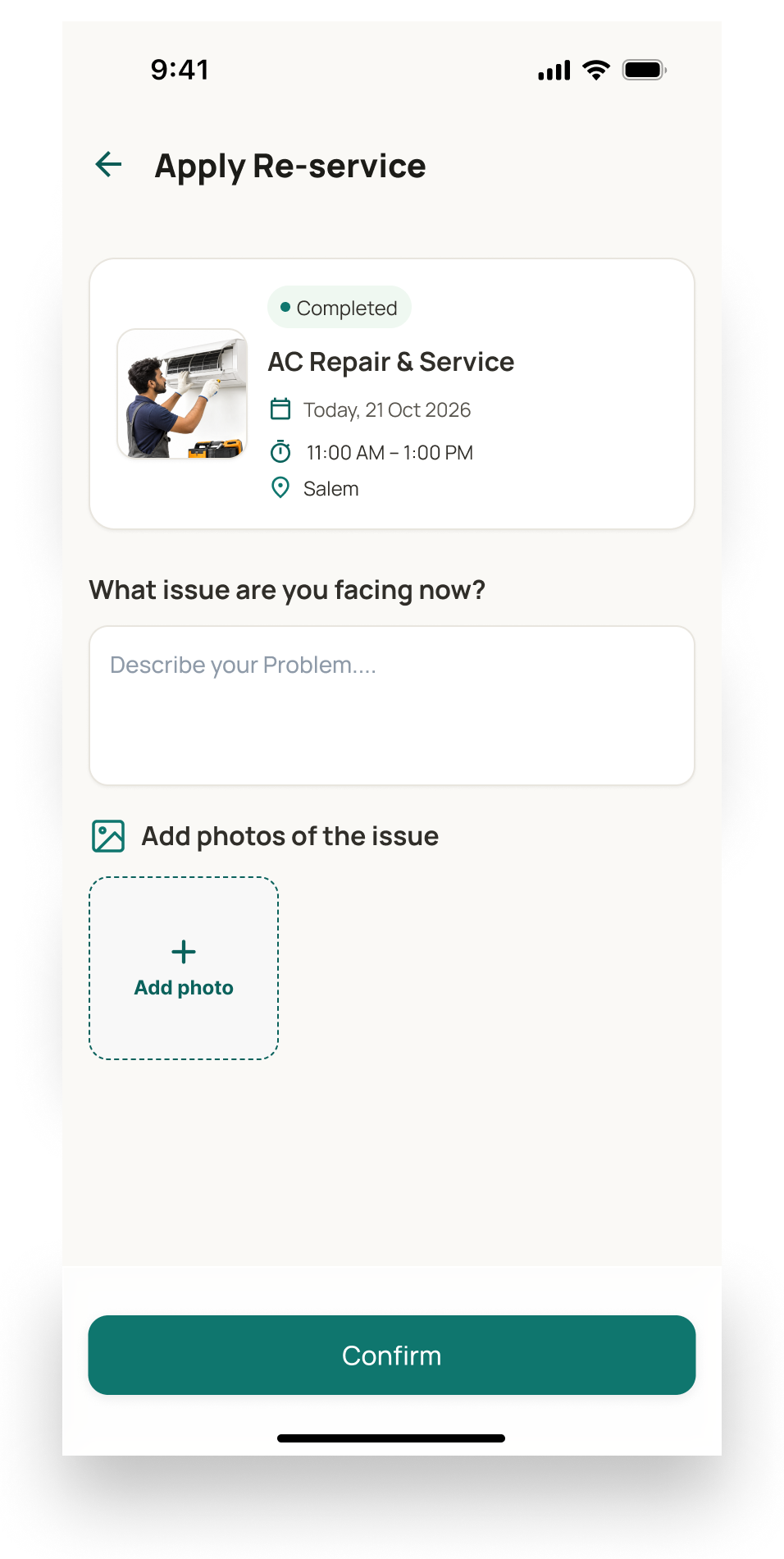
The re-service request was restructured around the completed job, with a clearer next action and eligibility context.

LOW-FI · INITIAL PROTOTYPE
Re-service — Low-fi prototype
HIGH-FI · REFINED PROTOTYPE
Re-service — High-fi prototype
MetricLow-fiHigh-fi
Task success
Conflicting blocks
100%
Drop-off
Conflicting blocks
0%
Misclick rate
18.8% or 33.3%
0%
Responses
2 or 1
1

The High-fi round completed without drop-offs or misclicks. The Low-fi report contains two separate Re-Service blocks with conflicting results, so they are shown as recorded rather than combined.

Limited by inconsistent Low-fi evidence and small participant counts.

Stage D · Learnings

What the testing revealed

Clarify Cost-Approval Decisions

Giving cost information and the approval action a clear hierarchy supported a faster decision flow. Additional-work approval averaged 20.4 seconds in High-fi, compared with 65.2 seconds in Low-fi, while task success remained at 100% in both rounds.

Make Follow-up Actions Easy to Find

A clear next action and accessible eligibility information help make post-service support understandable. The High-fi re-service request was completed successfully with no drop-offs or misclicks in the recorded task response.

Preserve a Successful Booking Flow

Refinement should strengthen a working journey without disrupting completion. AC repair booking retained 100% task success in both rounds, with a small reduction in misclick rate from 23.6% to 23.3%.

Small samples — 6 responses in the Low-fi round and 3 in the High-fi round. These are usability-testing observations, not statistically conclusive results.

Have an idea? Let's make it happen.

I'm always interested in meaningful projects, creative collaborations and opportunities to grow as a designer.